Plotter-style Hatching
No single origin work. Line-only tonal shading built from hatching predates computing (engraving and drawing). Its generative form is tied to the 1960s pen-plotter pioneers — Georg Nees, Frieder Nake and Vera Molnár drawing on drum and flatbed plotters — and continues as a plotter-community practice; a lineage rather than a datable first.
community / folk Name — A descriptive category label for pen-plotter hatching (as used by Nees, Nake, Molnár); no coined/eponymous name.
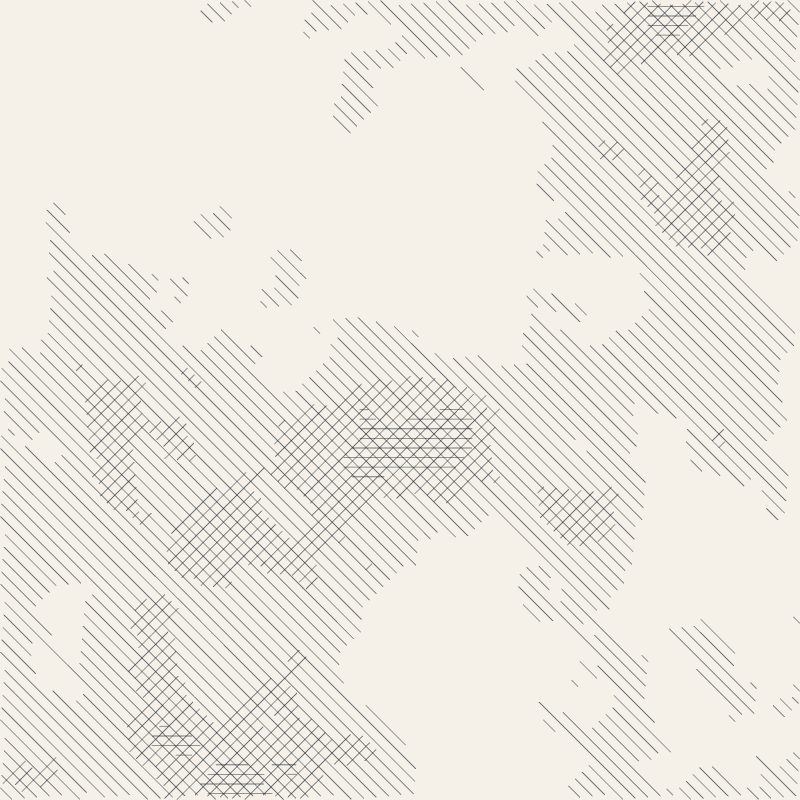
In one line Line-only shading in the spirit of a pen plotter: tone is built from the density and direction of hatching, cross-hatching and contour strokes rather than from filled pixels.
The code
The actual sketch behind the demo above — sandboxed and reproducible. This is the whole thing.
plotter-hatching/index.html
const SEED = Math.floor(Math.random()*1e9);

// Pen-plotter style cross-hatching: a noise field defines a "tone" at each
// point; darker tone → more hatch layers at varied angles. Lines only.
function setup() {
  noiseSeed(SEED); randomSeed(SEED);
  const s = Math.min(windowWidth, windowHeight);
  createCanvas(s, s);
  background('#f5f1e8');
  stroke(20, 30, 40, 150);
  strokeWeight(s * 0.0011);

  const FREQ = 0.0045;
  const tone = (x, y) => {
    // layered noise → 0..1, biased so most of the canvas is light
    let v = noise(x * FREQ, y * FREQ) * 0.7 + noise(x * FREQ * 3, y * FREQ * 3) * 0.3;
    return Math.max(0, Math.min(1, (v - 0.35) / 0.45));
  };

  // Hatch passes at increasing tone thresholds and rotated angles.
  const passes = [
    { angle: Math.PI * 0.25, thresh: 0.15 },
    { angle: -Math.PI * 0.25, thresh: 0.40 },
    { angle: 0, thresh: 0.62 },
    { angle: Math.PI * 0.5, thresh: 0.80 },
  ];
  const spacing = s * 0.012;
  const stepLen = s * 0.01;

  for (const pass of passes) {
    const { angle, thresh } = pass;
    const ca = Math.cos(angle), sa = Math.sin(angle);
    // sweep lines across the rotated domain
    const diag = s * 1.5;
    for (let off = -diag; off < diag; off += spacing) {
      let drawing = false;
      beginShape();
      for (let t = -diag; t < diag; t += stepLen) {
        // point on a line at this offset/angle, centered
        const x = s/2 + ca * t - sa * off;
        const y = s/2 + sa * t + ca * off;
        if (x < 0 || y < 0 || x >= s || y >= s) {
          if (drawing) { endShape(); drawing = false; }
          continue;
        }
        if (tone(x, y) >= thresh) {
          if (!drawing) { beginShape(); drawing = true; }
          vertex(x, y);
        } else if (drawing) {
          endShape();
          drawing = false;
        }
      }
      if (drawing) endShape();
    }
  }
}
function noFillInit(){}How it works
Because a plotter can only draw strokes (no fills), darkness must come from how many lines crowd an area: 1. Take a tone source — a greyscale image, an SDF, or a noise field. 2. For each region, choose a hatching density proportional to its darkness (more/closer lines = darker) and a direction (fixed, following the gradient, or a flow field). 3. Generate the strokes: parallel hatches, a second crossing layer for darker tones (cross-hatching), or iso-contours of the tone field. 4. Clip the strokes to shape boundaries and merge collinear segments so the pen lifts as little as possible. The output is a set of vector paths ready for a real pen plotter, giving the characteristic engraving-like line shading.
Parameters
spacing: number — Distance between adjacent hatch lines (controls tonal density).angle: number — Direction of the hatch lines.lineWidth: number — Pen/stroke width.crossHatch: boolean — Whether a second layer is drawn at an angle for darker tone.
Lineage
Frequently combined with
- Perlin / Simplex Noise · 9 works
- Bezier / Catmull-Rom Splines · 7 works
- Fragment Shader (GLSL) · 6 works
- Dithering · 4 works
- Generative Typography · 3 works
- Flow Field / Vector Field · 3 works
- 3D Mesh / Geometry · 3 works
- Modular Assembly / Parametric Character · 2 works
- Instanced Geometry · 2 works
- Voronoi Diagram · 2 works
- Boids / Flocking · 2 works
- Spring-Mass / Verlet · 2 works
Works using this algorithm (32)






Last updated 2026-07-16