Generative Typography / ASCII
No single origin work. Rendering images as grids of characters descends from early typewriter/teletype "type art" and 1960s–70s computer text-mode graphics, and persists as a diffuse coding-community practice (e.g. ertdfgcvb's browser playground). A technique with dispersed roots rather than a datable first.
community / folk Name — A descriptive category label, not a coined or eponymous name; no single coiner of the term is attested.
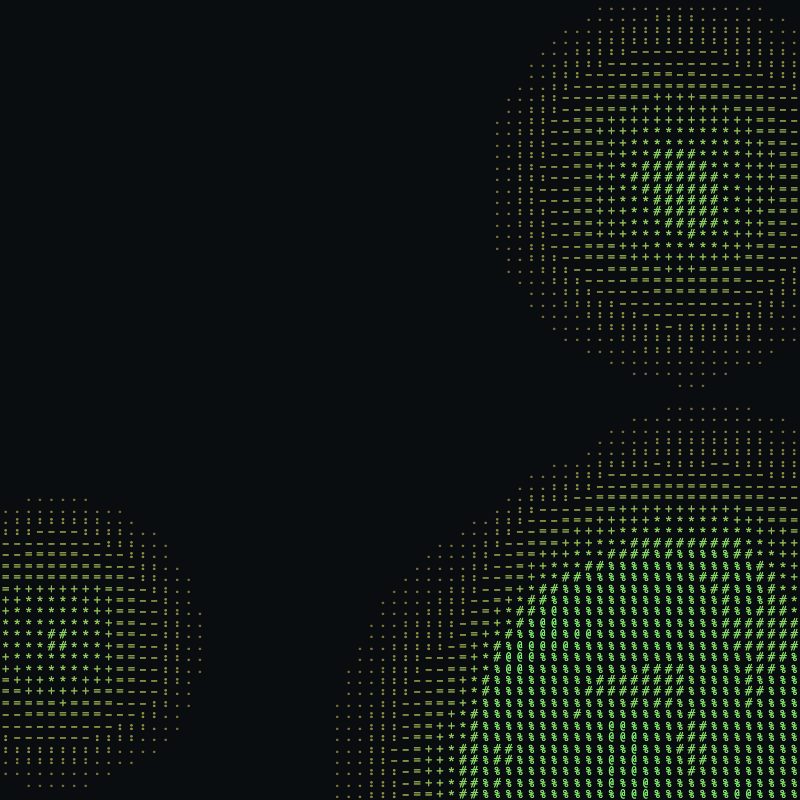
In one line Rendering an image as a grid of text characters, choosing each glyph by how well its ink density (or shape) matches the local tone — the basis of text-mode and ASCII-art visuals.
The code
The actual sketch behind the demo above — sandboxed and reproducible. This is the whole thing.
ascii-art/index.html
const SEED = Math.floor(Math.random()*1e9);

// Render a procedural light field (overlapping radial gradients) then map
// brightness to an ASCII glyph ramp — generative ASCII art.
const RAMP = " .:-=+*#%@";

function setup() {
  randomSeed(SEED); noiseSeed(SEED);
  const s = Math.min(windowWidth, windowHeight);
  createCanvas(s, s);
  background(10, 13, 16);
  textFont('monospace');
  textAlign(CENTER, CENTER);

  const COLS = 70;
  const cw = s / COLS;
  const rows = Math.floor(s / cw);
  textSize(cw * 1.15);

  // light sources
  const lights = [];
  const n = 3 + Math.floor(random(3));
  for (let i = 0; i < n; i++) lights.push({ x: random(s), y: random(s), r: random(s*0.2, s*0.45) });
  const hueBase = random(360);
  colorMode(HSB, 360, 100, 100);

  for (let j = 0; j < rows; j++) {
    for (let i = 0; i < COLS; i++) {
      const x = i*cw + cw/2, y = j*cw + cw/2;
      let b = 0;
      for (const L of lights) {
        const d = Math.hypot(x-L.x, y-L.y);
        b += Math.max(0, 1 - d / L.r);
      }
      b = Math.min(1, b) * (0.7 + 0.3*noise(i*0.2, j*0.2));
      const ch = RAMP[Math.min(RAMP.length-1, Math.floor(b * RAMP.length))];
      if (ch === ' ') continue;
      fill((hueBase + b*80) % 360, 55, 40 + b*60);
      text(ch, x, y);
    }
  }
}How it works
Lay a grid of character cells over the image (its resolution = the art's "pixels"). For each cell: 1. Average the source brightness within the cell. 2. Map that brightness to a glyph from a ramp ordered by ink coverage — e.g. " .:-=+*#%@" from light to dark — so darker cells get denser characters. 3. (Optional) instead of brightness, match the cell's gradient/edges to line-like glyphs (/ \ | _) for an edge-following look, and add colour by tinting each character. Because the same per-cell rule runs every frame, feeding it a live source or a time-varying function (as in ertdfgcvb's playground) animates the text image.
Parameters
charSet: array — Glyphs ordered by visual density, mapped from light to dark.cellSize: number — Pixel block each character represents.sourceMapping: string — What drives the glyph choice (image brightness, noise, a 3D scene).fontSize: number — Type size the characters are drawn at.
Lineage
Frequently combined with
- 3D Mesh / Geometry · 1 work
- Generative Typography · 1 work
- HSL / Hue Cycle · 1 work
- Particle System · 1 work
Works using this algorithm (4)

Last updated 2026-07-16